PORTFOLIO CASE STUDYDesigning with AI: From production tool to system builder
AI in creative practice – what changed, and where the limits are.
ToolsClaude (Cowork / Design): Primary production environment; system/tool building
Adobe Firefly: Image generation and asset exploration
Figma: Component libraries, design files
Adobe Creative Suite: Final production, print prep
The context
Design at Tanium spans brand, campaigns, and events. The brand is specific, tightly governed, and visible at scale – in front of enterprise customers, at major industry events, across a global sales organisation. The work moves fast. Event deadlines are deadlines that can’t drift. Campaign assets have to land on time and on brief. Brand compliance is important.
The question was never whether the work could be done – it was whether it could be done at the standard it needed, within the time we had been given. Volume and quality rarely negotiate well without something changing in the process.
In 2025, AI changed the process.
This is a case study in how I integrated it into my creative practice. What it enabled me to produce. What it enabled me to build. And where, honestly, it has its limits.
The approach
I use AI in two distinct modes, and conflating them would misrepresent what each is actually good for.
Production
Using AI to execute complex, time-sensitive work at quality. This is the accelerator mode: faster iteration, more options explored, deliverables produced with fewer handoffs. The output is the same kind of work I'd have made before; the process is faster and more efficient.
Systems
Using AI to build tools that work without me. Instead of processing the same request for the twentieth time, I built something that enables self-service. The output isn't a design asset – it's infrastructure.
Both matter. The right tool depends on the job. Knowing which is which is part of the practice.
Project 01The Static HTML5 Ad Set
The problem
Tanium’s digital marketing team had been using AI to generate display ads independently – fast, flexible, but inconsistent. Some output was fine. Some had incorrect logos, layouts that broke at certain sizes, copy that drifted away from the brand voice. Ads were getting in front of leadership and external audiences before anyone with brand oversight had reviewed them.
This wasn’t a process failure so much as a capability gap. The team needed to move quickly. They were using the tools available. The brand rules that constrain a trained designer aren’t immediately visible to someone working under time pressure without a design background. The result was creative going out that ranged from good to off-brief, and no reliable way to know which until it had already shipped.
The question that came out of a cross-team discussion with digital marketing and digital ops was direct: how do we keep the speed while recovering the governance?
What I built
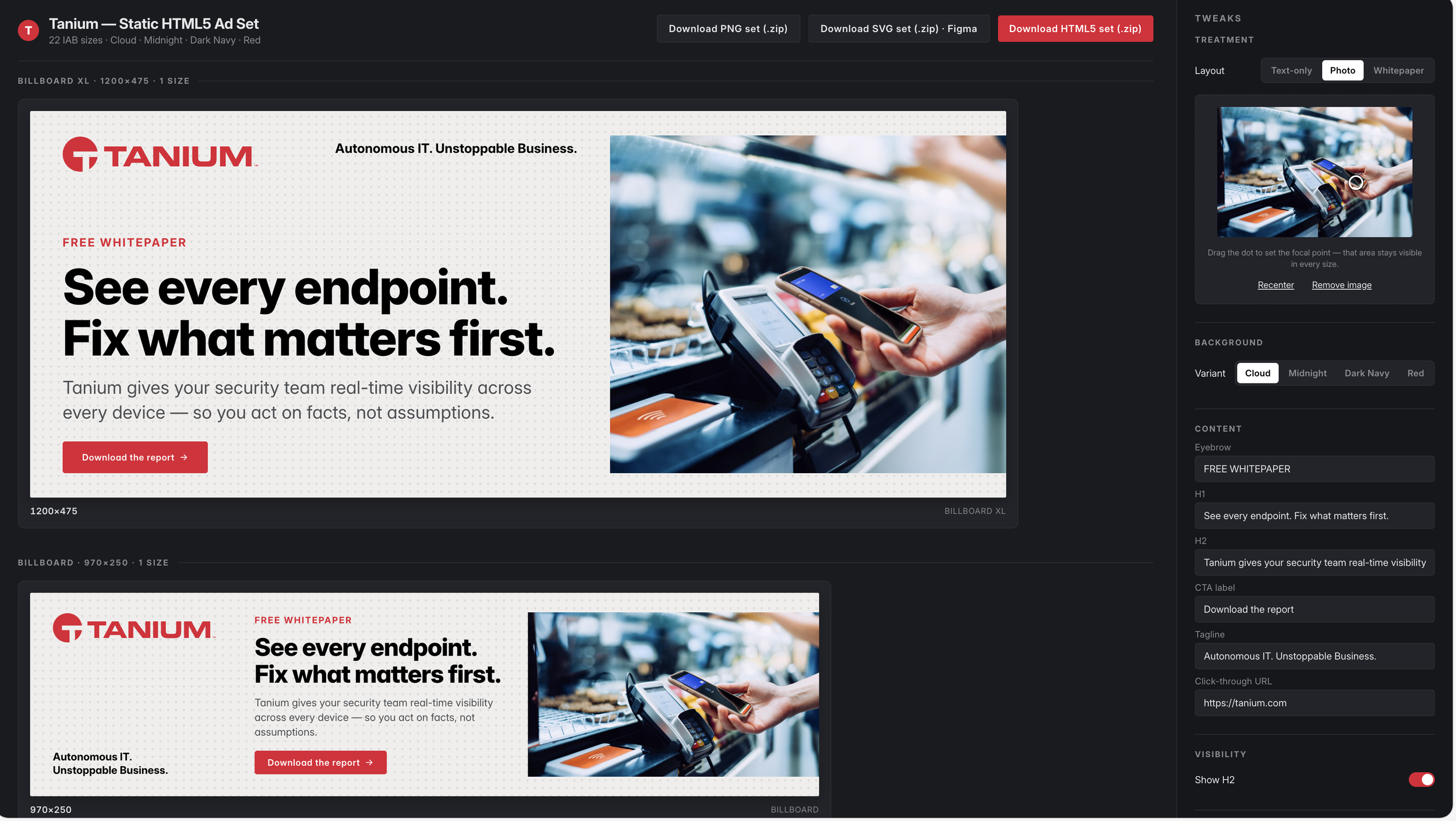
The Tanium Static HTML5 Ad Set is a browser-based production tool built in Claude Design, covering 22 IAB sizes across all standard display formats.
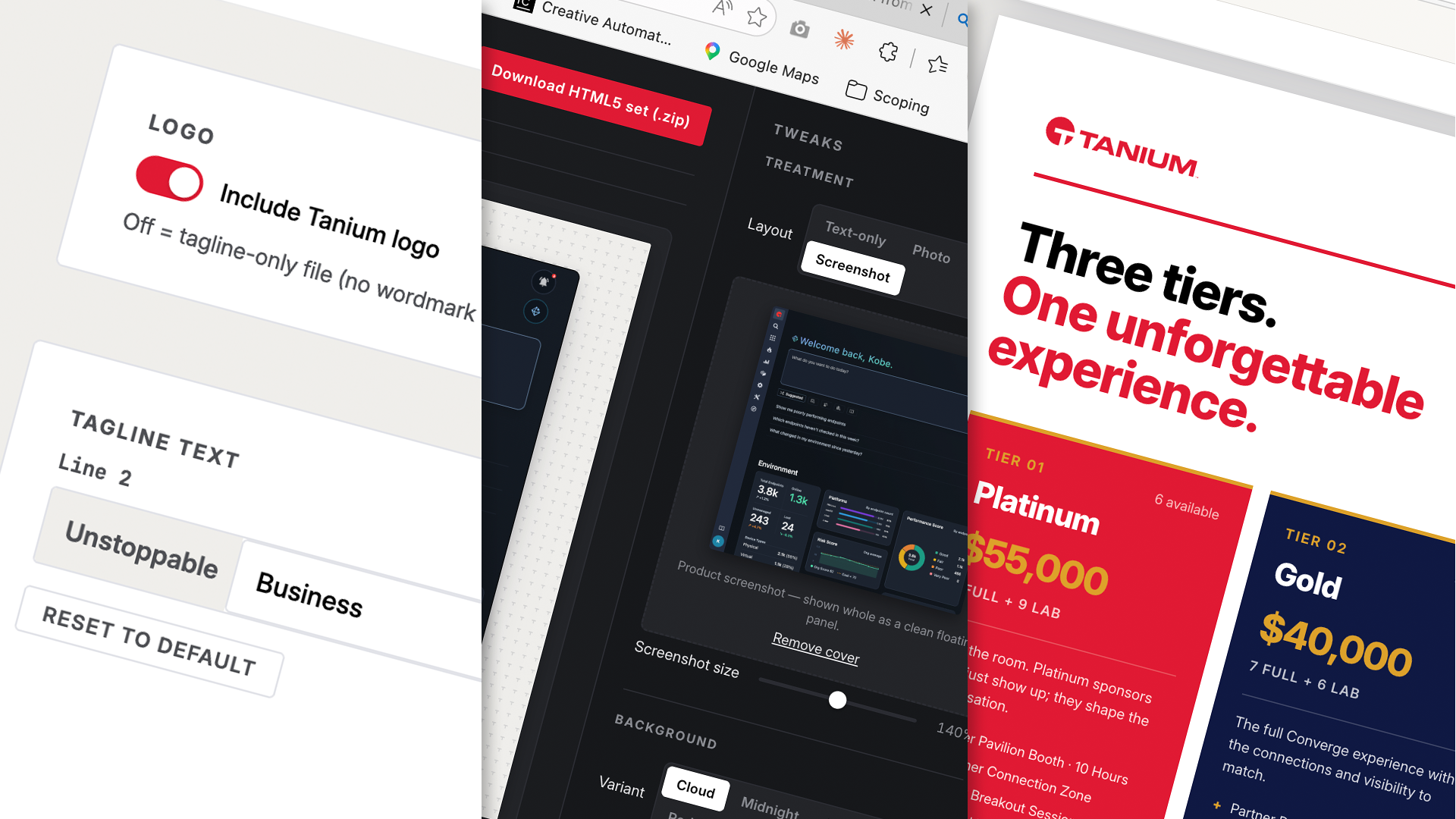
The interface maps to the way the team actually works. Choose a layout treatment – text-only, photo, whitepaper/collateral, or product screenshot. Select a brand background – Cloud, Midnight, Dark Navy, or Red. Edit the content directly: headline, subheading, CTA label, tagline, click-through URL. Every size updates in real time. Colour variants, type sizes, and visibility toggles are all accessible from a single panel without touching code or layout files.
Exports are available in three formats from within the tool: PNG set, SVG set (Figma-compatible), and HTML5 (.zip) – ready for direct upload to 6sense, LinkedIn, or any standard display network.
Every configuration available in the tool is within brand-approved parameters. The user doesn't need to know the colour system, the type hierarchy, or the layout rules – those are encoded into the options themselves.
Why this matters
The governance problem in brand is rarely about intent. It's about capability gaps and time pressure arriving together. Someone needs an ad today. They know approximately what it should look like. They work with what they have. The result is close, but not right, and by the time it's flagged, it's already been used.
A tool that is brand-compliant by construction changes that dynamic. It doesn't require the person using it to carry the brand rules in their head. It encodes the rules into the available choices. That's a different kind of quality assurance than review and approval – it's governance that runs without supervision.
The roadmap continues: prompt-based remix functionality to explore net-new design directions from within the tool, a companion social media version covering LinkedIn formats, and support for video and animated formats as the capability matures.
Project: Tanium Static HTML5 Ad Set
Status: WIP – in active use and iteration, May 2026
My role: Designer and builder
Collaborators: Digital Marketing, Digital Ops
AI tools: Claude Design
Output: Static HTML5, PNG, SVG optimised for Figma import
Custom focal point for images
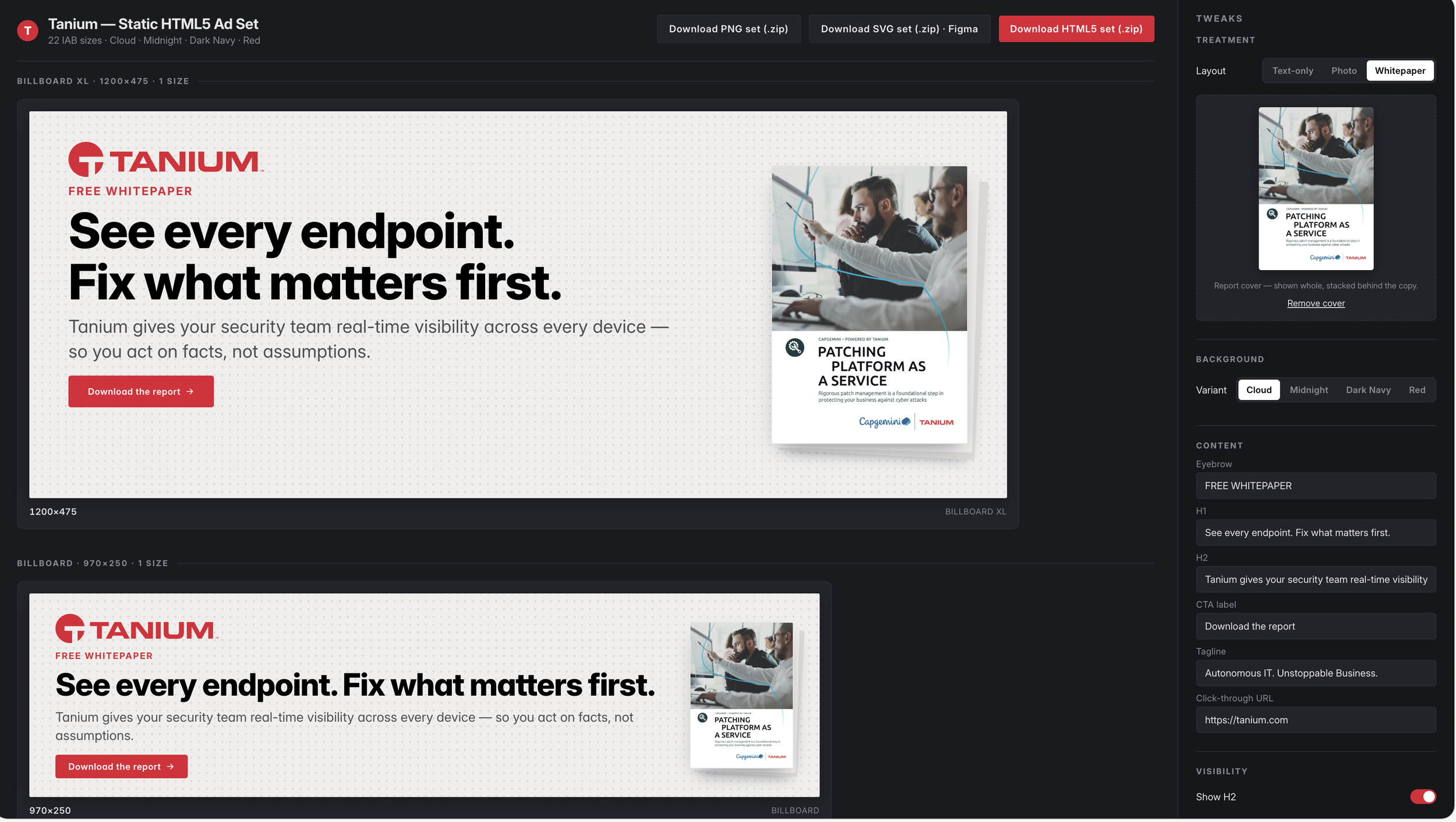
Automatic collateral render
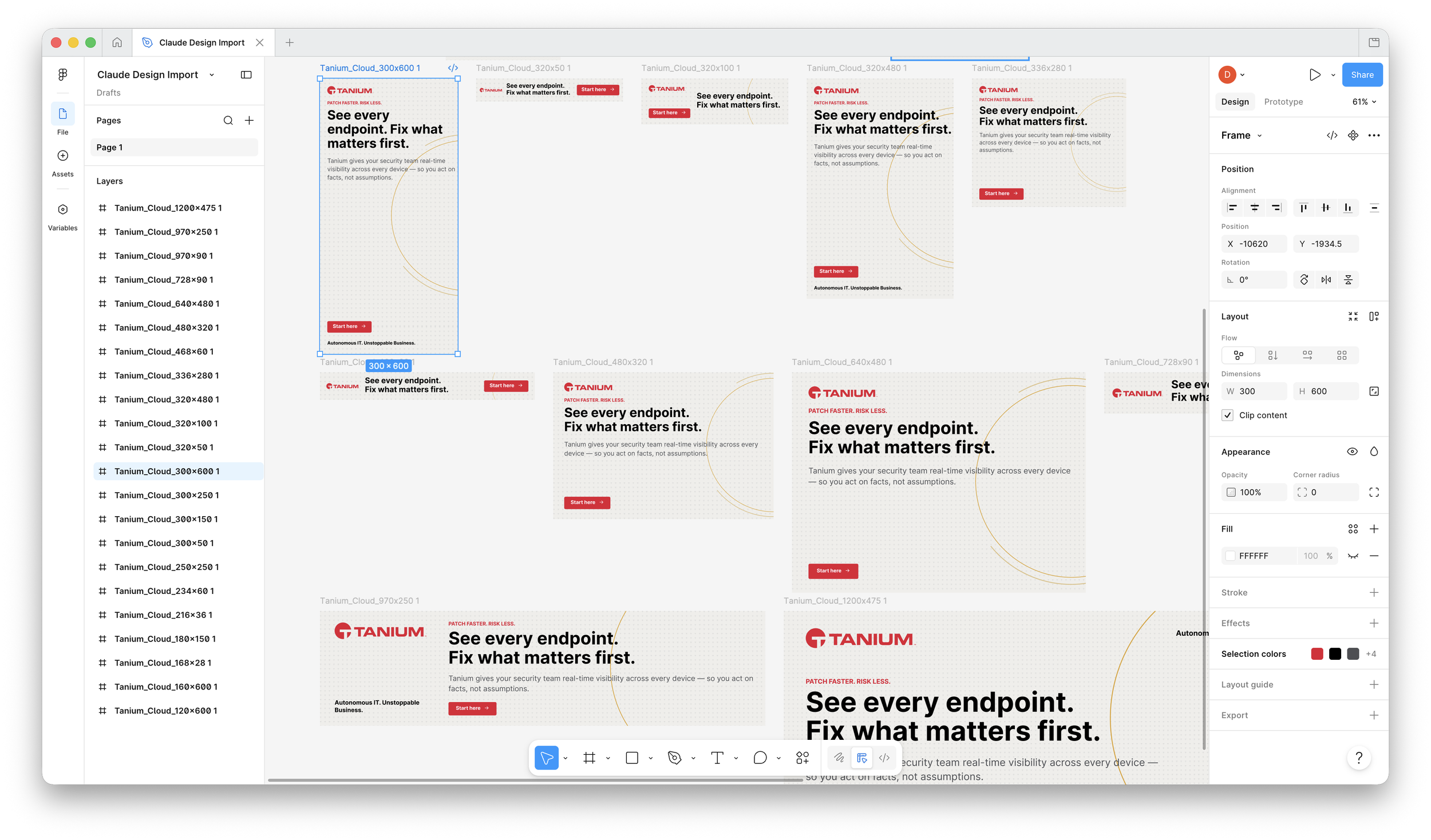
SVGs imported to Figma
Project 02Converge 2026 Global Sponsorship Prospectus
The brief
Tanium Converge is the company’s main annual event. The 11th edition is at ARIA in Las Vegas in November 2026 – a four-day conference for IT, security, and operations leaders and their partners. In 2025, it drew 3,172 attendees from 964 organisations in 44 countries.
Sponsorship at this scale is a major business discussion. The prospectus had to match the following: event overview, 2025 results, tier pricing (ranging from $55,000 to $2,500), benefits matrix, booth specs, add-ons, public-sector track details, and a full legal agreement. It also included a partner invitation letter from Tony Beller, SVP Global Partner Sales, to start the conversation before the prospectus arrived.
That’s a large scope, the materials must look like they came from a professional events and partner marketing team, not a rushed design sprint or a messy Word doc.
The process
Before generating anything in Claude, I translated Tanium’s brand guidelines into a markdown file – a brand.md that encodes colour, typography, voice, and graphic device rules in a format AI tools can actually interpret and act on. This became the governing document for the project: loaded into Claude at the start of each session, it keeps output within brand parameters without requiring constant manual correction after the fact.
I drafted the prospectus section by section in Claude – event overview, stats, tier structure, benefits, add-ons – using the events brief and 2025 attendance data. Claude handled layout, copy style, and visual consistency across 13 pages. I then laid out the invite letter, which needed only two iterations to tighten copy and refine layout before distribution. The prospectus required more review from executives, legal, and events, but using Claude produced a rough draft 14 days earlier than traditional methods.
The final pass was in Acrobat: export optimisation, PDF compliance, embedded fonts, and file size management for external partner distribution.
Why brand.md matters
The most transferable thing from this project isn’t the document. It's the brand.md approach.
A markdown translation of brand guidelines can be dropped into any AI tool that accepts text context – Claude, Figma AI, Copilot. It means brand governance travels with the workflow. Rather than correcting AI output after the fact, the constraints are built into the starting conditions. For an organisation where AI use is growing across multiple teams and functions, that's a more reliable approach than designer review at the end of every generation cycle.
Project: Converge 2026 Global Sponsorship Prospectus
Event: Tanium Converge 2026, Las Vegas, NV
Status: Pre-event – materials in market
My role: Designer and content producer
AI tools: Claude (Cowork / Design)
Production pipeline: Claude → Acrobat (export optimisation)
Deliverables: 13-page prospectus; Partner invite letter; Sponsorship agreement form
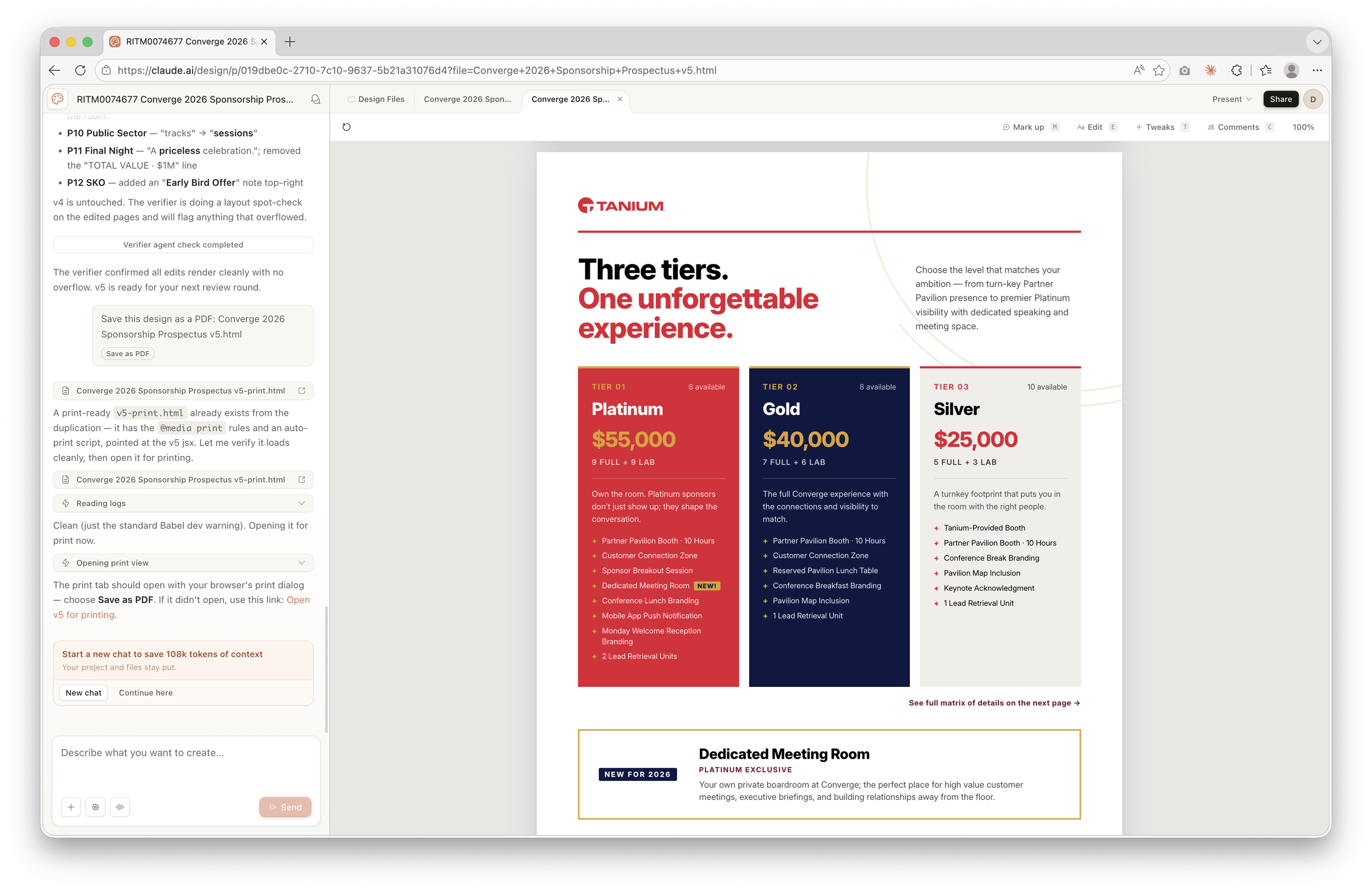
Claude Design Interface
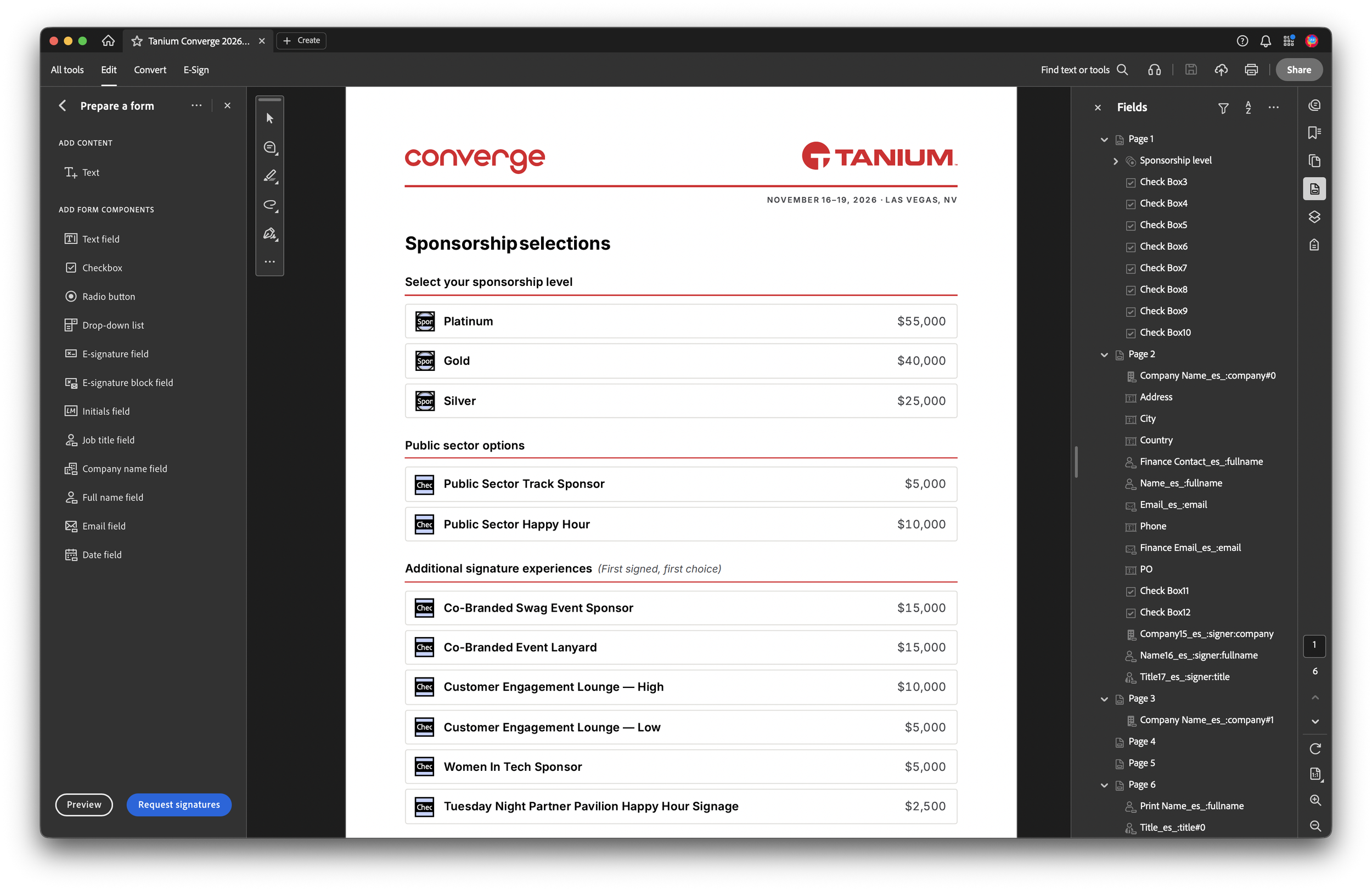
Creating a form with Adobe Acrobat
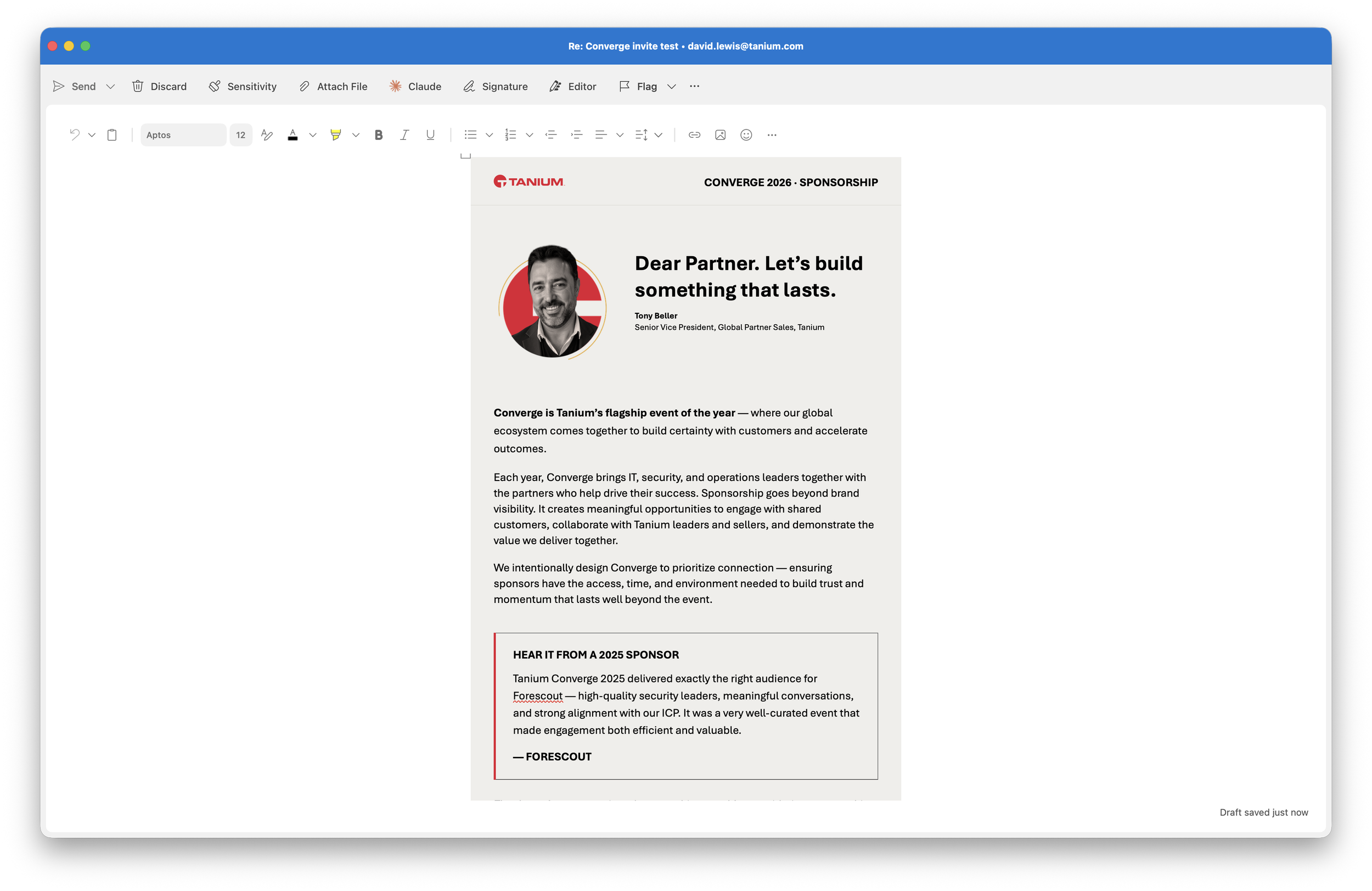
HTML email template in Outlook
Project 03The Tagline Lockup System
The recurring request
The Tanium wordmark sits alongside a tagline. The approved construction is: Autonomous IT. [Line 2]. Line 2 is where customisation happens – by industry, by function, by audience. Sales teams need versions for healthcare, government, defence. Marketing need versions for campaign landing pages. People want versions for internal presentations, for swag, for co-branded contexts.
Every one of those requests used to come to me.
Not because they were difficult – the work, once you understood the rules, took ten minutes. But it still had to route through me. It required design software, access to approved assets, and knowledge of brand constraints the requester didn't have. Multiply that across a global organisation and it becomes a persistent, low-grade drain on capacity that never shows up in a project tracker but is always there.
The obvious question, eventually, was: why am I still the answer to this?
What I built
The Tagline Lockup System is a browser-based tool – built in Claude Design – that lets anyone at Tanium generate a compliant logo and tagline lockup without involving design.
The interface is deliberately simple. There are three approved layout configurations of the Tanium signature. Line 2 is customisable via free text or preset categories: industry verticals (Government, Healthcare, Finance, Defence, Retail, Manufacturing, Education), business functions (Marketing, Sales, Security, Engineering, Operations), and a set of informal options for internal or social use. A logo toggle controls whether the Tanium wordmark is included or suppressed – the tagline-only variant is useful for decoupled branding and layout flexibilty.
Every preview renders against brand-accurate backgrounds with auto-applied accent colours, so what you see reflects how the lockup will actually appear in use.
Exports are production-ready. Digital formats (SVG and PNG) and print formats (EPS and PDF) are available directly from the tool, labelled clearly by use case. SVG and PDF exports convert all type to outlined paths before download – the file carries no font dependency. It can go straight to a printer or into a presentation and it will hold.
Why this matters
The tool is brand-compliant by construction. There are no wrong answers available: only approved configurations, correct colours, correct type treatment. A non-designer using it cannot accidentally produce something off-brand. That isn't a feature of the tool. That is the purpose of the tool.
Building it took a fraction of the time it would have taken in a traditional development environment. Iterating on it – refining export behaviour, tightening the colour logic for the horizontal layout variant, adding production-quality details like outlined font exports – was a conversation, not a sprint.
Project: Tanium Tagline Lockup System
Timeline: Two days
My role: Designer and builder
AI tools: Claude Design
Output: PNG, PDF, SVG, EPS
Features: Every export has a transparent background. Outlined type.
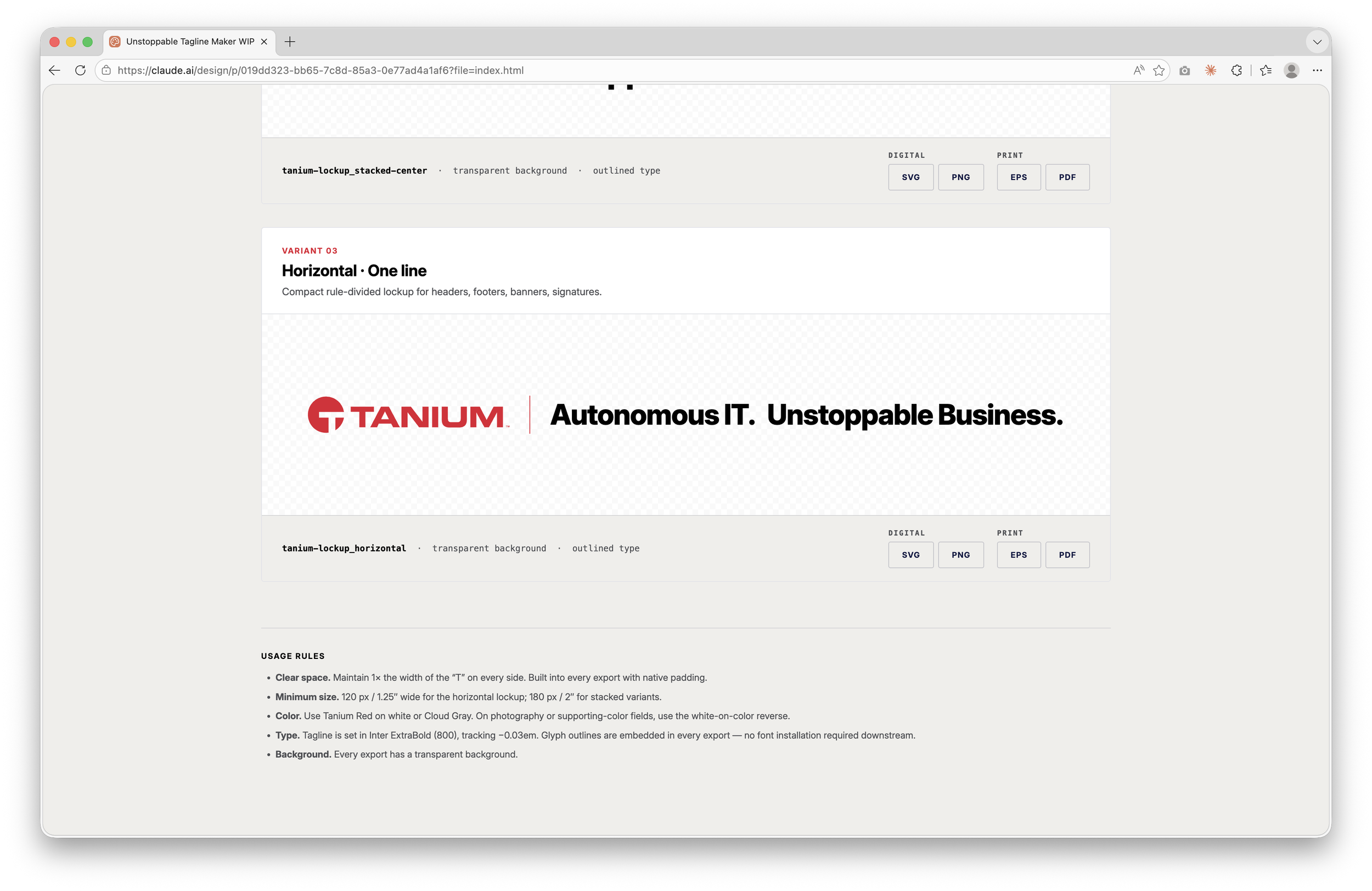
Horizontal logo and tagline
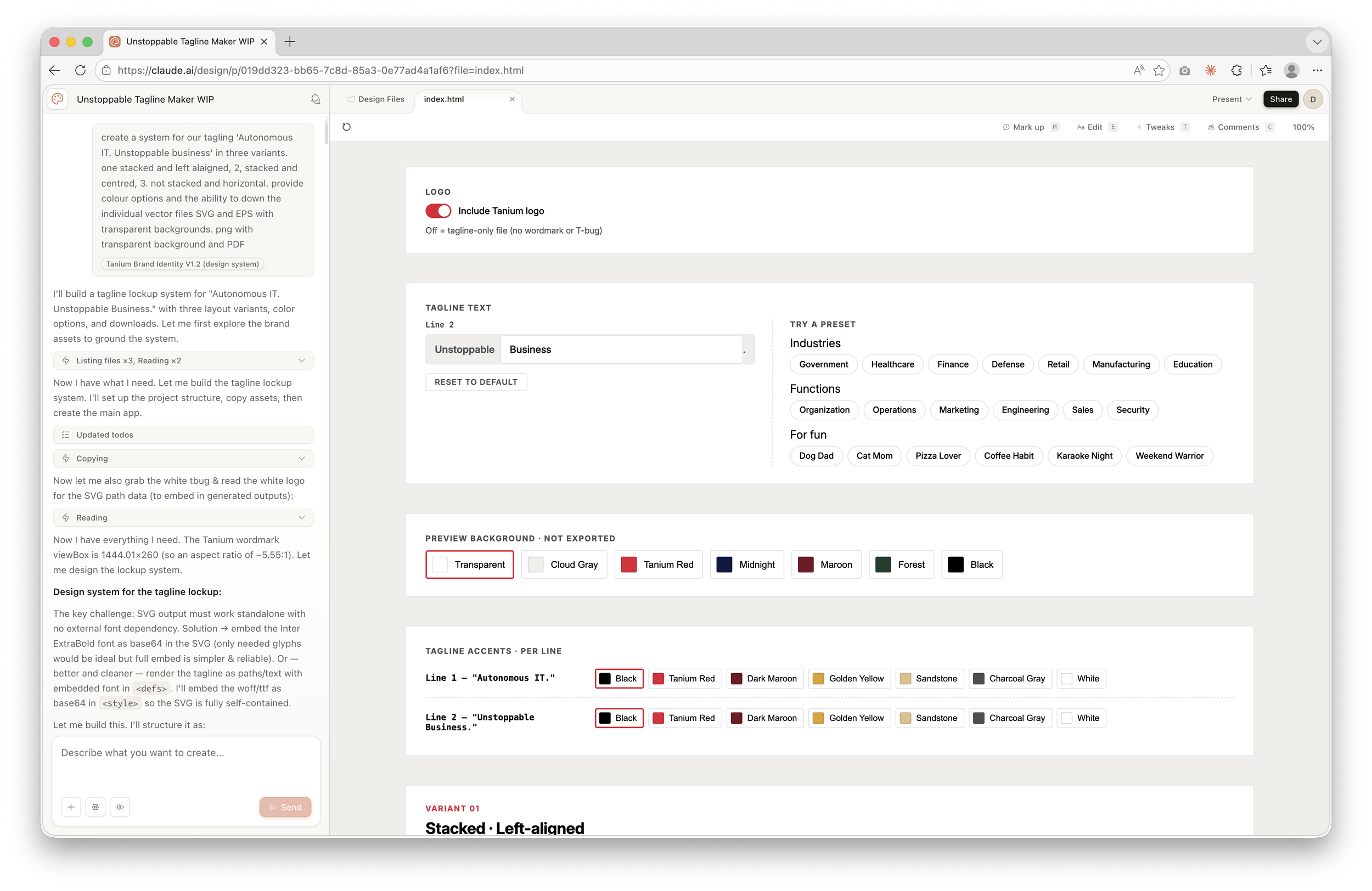
Default overide options
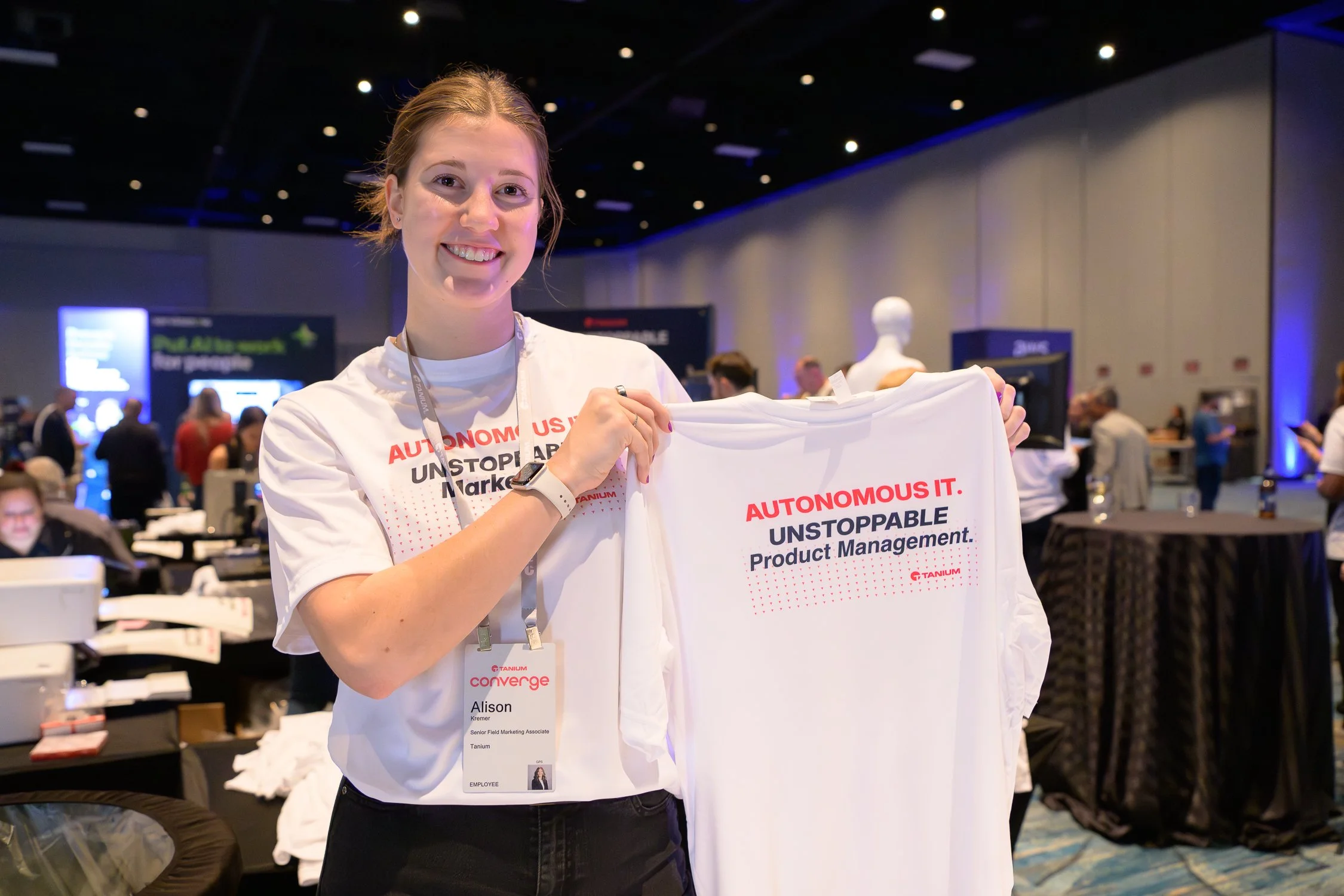
Custom t-shirt design using tagline
Image production – Adobe Firefly
Not every AI contribution is a tool or a production environment. Adobe Firefly (with access to Firefly, Nano, and GPT image generation) handles a different category of work entirely: creating original imagery where stock falls short, or where the brief requires something that doesn't exist yet.
In practice this covers four recurring use cases. New stock imagery – generating on-brand scene photography without licensing constraints or the compromise of choosing the least-bad option from a library. Product mock-ups – placing Tanium assets into realistic contexts for campaign and sales materials. Executive portrait work – harmonising headshots for web and presentation use, correcting lighting inconsistencies, and bringing portrait sets into visual alignment when they've been shot across different sessions and conditions. And high-fidelity swag reviews – generating 3D renders of physical items such as challenge coins and branded merchandise so stakeholders can review against a realistic visual before committing to print production.
Each of these was previously either time-consuming, reliant on a specialist, or both. The work is now part of the standard design workflow.

Reflection
AI has not made the job easier in the way that’s usually implied. It hasn't made decisions. It hasn’t replaced taste, or judgment, or the ability to push back on a wrong brief. What it has done is reduce the cost of doing things well.
That distinction matters because it shapes how I’ve chosen to use it. The goal was never to lower the floor – to get something acceptable out faster. It was to raise the ceiling: more considered deliverables, better iteration, and tools the team can now use without involving design.
There are things I’ve learned to work around. Claude Design has no easy undo – every change commits immediately, which means exploratory edits require care and a clear sense of what you’re willing to lose. Layout consistency across sizes needs manual review; what looks right at billboard scale can shift noticeably at a smaller format. And the tools work best when given strong reference material – an approved design to learn from, a clear brand context, and most of the creative direction already established. Given that starting point, they scale well. Asked to start from a blank brief, the results are less reliable. That's not a criticism; it’s an accurate description of what the tools are good at, and shaping the input accordingly is part of the craft.
The honest version of the AI story in creative work isn't ‘this does the job now.’ It's ‘this changes which parts of the job take time.’ The work AI can't reach is still the majority: stakeholder management, brand governance, knowing when a creative direction is wrong and articulating why, building the kind of trust that means teams come to design early rather than late. None of that has changed.
What’s changed is the ratio. The hours that used to go on mechanical execution – rebuilding layouts, reformatting assets, producing the fifth version of something that should have been locked weeks ago – those hours are smaller. What happens with the difference is the more interesting question.